> ## Documentation Index
> Fetch the complete documentation index at: https://docs.autoreacter.com/llms.txt
> Use this file to discover all available pages before exploring further.
# Invite
> Learn how to invite the bot to your server.
# Invite AutoReacter
There are multiple ways to invite AutoReacter to your server.
## Method 1: Using Bot Profile
The quickest way to invite the bot:
1. Find **AutoReacter** in your server's members sidebar
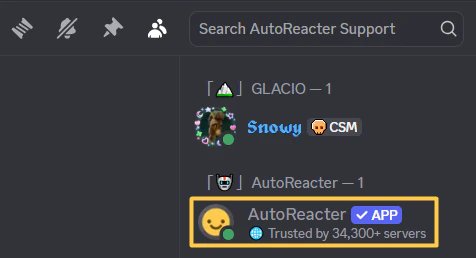 2. Click the **"Add App"** button
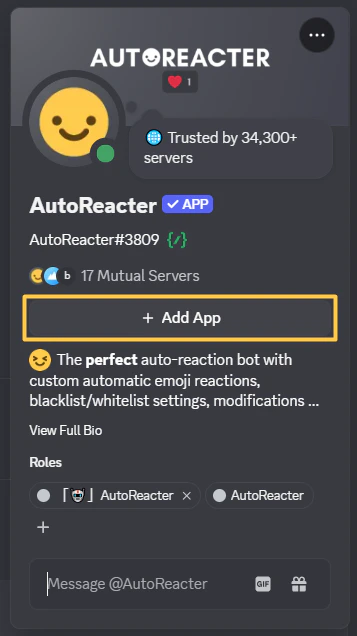 3. **Select the server you want to add AutoReacter to:**
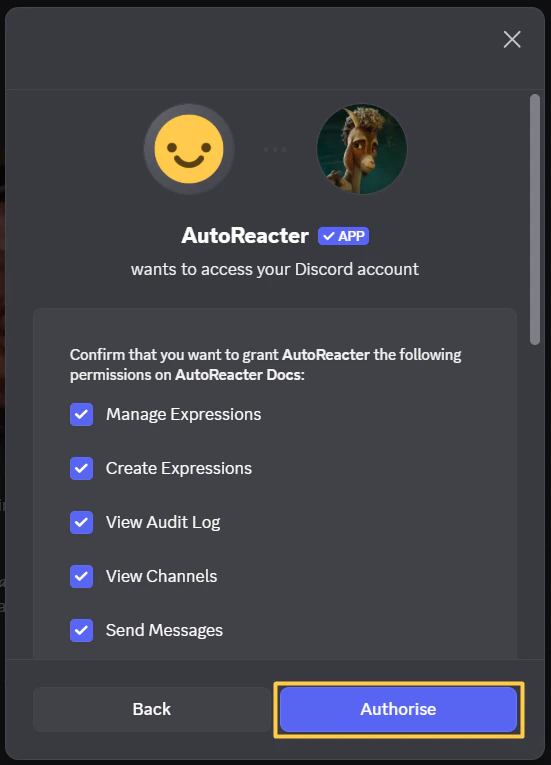
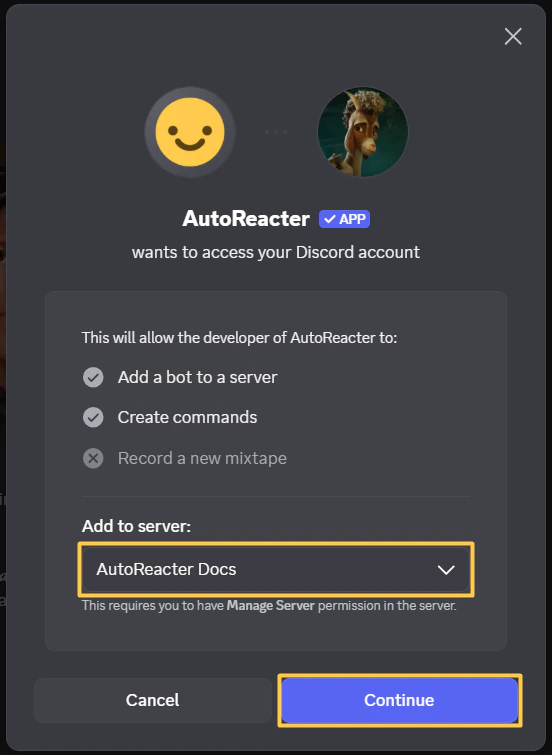 4. **Authorize the permissions:**
 ***
## Method 2: Using `/invite` Command
Get the invite link directly in Discord:
1. Run `/invite` in any server where AutoReacter is already added
2. Click the **"Invite AutoReacter"** link
3. [**Select the server you want to add AutoReacter to**](#select-server)
4. [**Authorize the permissions**](#authorize)
***
## Method 3: Using the Website
Invite via the official website:
1. Go to [autoreacter.com](https://autoreacter.com)
2. Click **"Invite Bot"** button
3. [**Select the server you want to add AutoReacter to**](#select-server)
4. [**Authorize the permissions**](#authorize)
***
## Permissions Required
AutoReacter needs these permissions to function properly:
* **Add Reactions** - Add emoji reactions to messages
* **View Channels**, **Read Message History** - See messages in channels
* **Send Messages**, **Send Messages in Threads** - Send responses and slash commands
* **Manage Messages** - Delete unreacted messages (if modification enabled)
* **Use External Emojis** - Use custom emojis from other servers
* **Create Expressions**, **Manage Expressions** - Create emojis with `/clone` command
* **Embed Links** - Embed links when needed
* **Attach Files** - Send files when needed
* **Use External Stickers** - For future features
* **View Audit Log** - See who invited AutoReacter (for welcome message)
***
## Welcome Message
When you invite AutoReacter to your server, you'll receive a welcome message:
***
## Method 2: Using `/invite` Command
Get the invite link directly in Discord:
1. Run `/invite` in any server where AutoReacter is already added
2. Click the **"Invite AutoReacter"** link
3. [**Select the server you want to add AutoReacter to**](#select-server)
4. [**Authorize the permissions**](#authorize)
***
## Method 3: Using the Website
Invite via the official website:
1. Go to [autoreacter.com](https://autoreacter.com)
2. Click **"Invite Bot"** button
3. [**Select the server you want to add AutoReacter to**](#select-server)
4. [**Authorize the permissions**](#authorize)
***
## Permissions Required
AutoReacter needs these permissions to function properly:
* **Add Reactions** - Add emoji reactions to messages
* **View Channels**, **Read Message History** - See messages in channels
* **Send Messages**, **Send Messages in Threads** - Send responses and slash commands
* **Manage Messages** - Delete unreacted messages (if modification enabled)
* **Use External Emojis** - Use custom emojis from other servers
* **Create Expressions**, **Manage Expressions** - Create emojis with `/clone` command
* **Embed Links** - Embed links when needed
* **Attach Files** - Send files when needed
* **Use External Stickers** - For future features
* **View Audit Log** - See who invited AutoReacter (for welcome message)
***
## Welcome Message
When you invite AutoReacter to your server, you'll receive a welcome message:
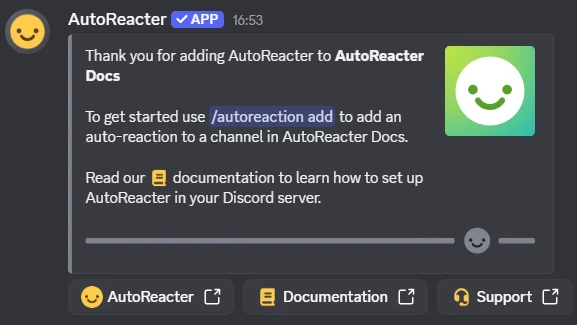 This message confirms the bot was successfully added and gives you quick links to get started.