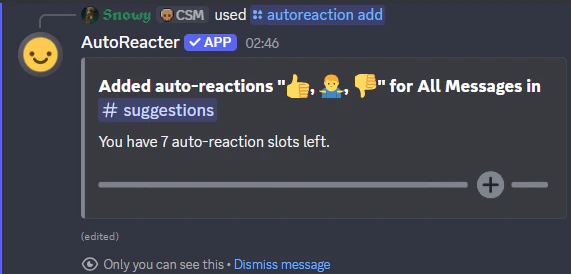
/autoreaction add
Add an auto-reaction to a channel. The bot will automatically react with your chosen emoji(s) to matching messages.Permissions
- Requires: Administrator or Manager
Usage
Fill in the parameters below and run/autoreaction add.
Parameters
1. Reaction (Required)
- The emoji or emojis to react with
- Separate multiple emojis with spaces
- Supports Unicode emojis (😀, 🎉, 🌟), custom server emojis, and animated custom emojis

2. Type (Required)
- Which messages the bot should react to
- All Messages - React to every message
- Text Only - React only to text messages
- Image Only - React only to messages with images
- Video Only - React only to messages with videos
- Media Only - React to images and videos
- Link Only - React only to messages with links
Auto-reaction Types
Learn more about each message type filter.
3. Channel (Optional)
- The channel to add the auto-reaction to
- Defaults to the current channel if not specified
- Can be any text channel, voice channel, or forum
Stacking Auto-Reactions: If an auto-reaction already exists in a channel, using the
/autoreaction add command again will add another auto-reaction on top of it with the next order number.If you use this command in a forum channel, after the emojis are validated you will be prompted with a menu to choose where the bot should react: replies only, posts only, or both.
If you add an auto-reaction directly to a specific forum post, those post-level reactions take priority and the parent forum channel’s reactions will no longer apply to that post.
Examples
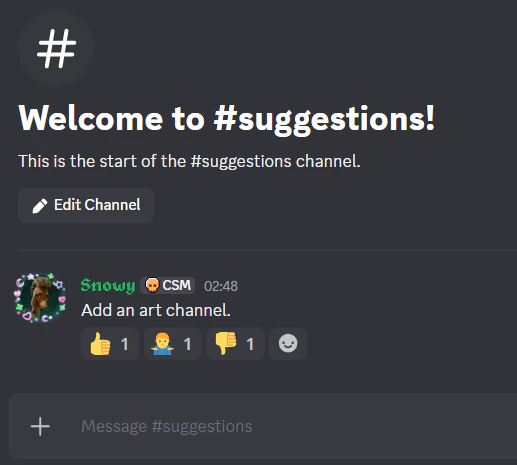
Multiple emojis reacting to all messages in #suggestions: